Turn your Webflow PDFs into leads.
Put an email gate on any brochure, price list or white paper. The link doesn't change, consent is never pre-ticked, and you see who downloaded what. Every file is still served from a fast CDN, with permanent URLs that survive plan changes and site handovers.
Free plan for file hosting, no credit card. Lead capture from Starter at $9/mo.
- [email protected] q3-proposal.pdf Just now
- [email protected] annual-report-2026.pdf Today
- [email protected] annual-report-2026.pdf Yesterday
How It Works
Three steps. Same link.
The buttons and links already on your Webflow site keep working. The file just asks who’s downloading it first.
-
Turn on “Require email”
Pick a brochure, price list or white paper you host with DocBeam and switch the gate on for that one document, in the Webflow Designer or your dashboard. No code, no form embed.
-
The visitor leaves an email
The same link now asks for an email (and, if they like, a name and company) and a consent box that is never pre-ticked. Then the file downloads.
-
You see who downloaded it
Each lead shows up against the document it came from. Export a CSV whenever you like, and get a daily summary email.
Why DocBeam
A gate that doesn’t break your site.
A gated download usually means a form embed, a new landing page and a round of re-linking. DocBeam gates the file itself.
The link stays the same
Gating happens at the file’s existing DocBeam address. Nothing to re-link, and nothing on your Webflow pages needs to change.
No code, no form embed
There is no script to paste and no form builder to wire up. It’s a switch on the document, and you can turn it off again the same way.
Consent is never assumed
The consent box names your site and is never pre-ticked. The visitor ticks it, or the file does not download.
Asked once, not every time
A visitor who comes back to the same file, in the same browser, is not asked again for 30 days.
Hosting
Behind every gate, hosting that holds up.
The link a lead clicks is a DocBeam link: served from a fast CDN, permanent, and yours. That is what lets the gate sit on the link you already have.
One URL. It stays put.
Every file gets a permanent CDN URL the moment you upload. It doesn’t change when you switch plans, when a client moves or hands over their Webflow site, or when you put a gate on it.
Replace Files, Keep Every Link
Upload a new version of this year’s price list and every existing link serves it within minutes. No find-and-replace, no broken downloads.
Bigger Than Webflow Allows
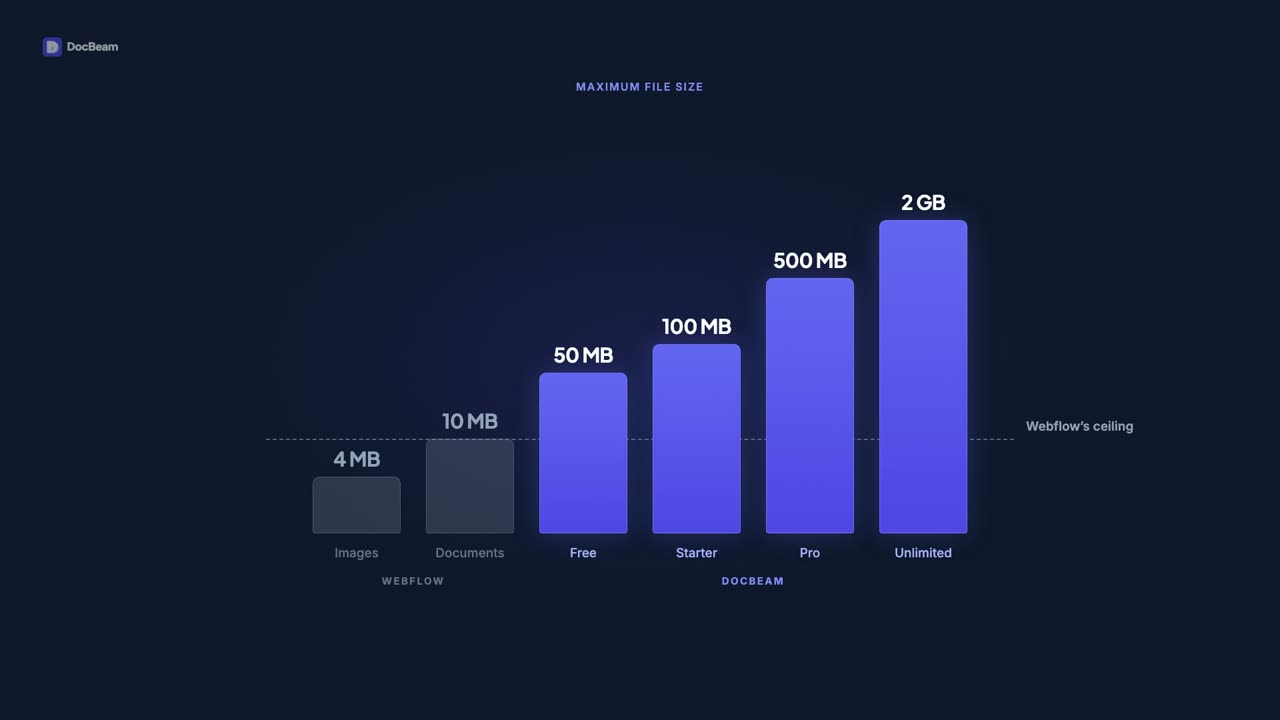
Webflow caps document uploads at 10 MB. DocBeam takes files up to 50 MB on Free and 2 GB on Unlimited Sites, uploaded from a panel inside the Designer.
Fast Downloads, Everywhere
Every file is stored on Cloudflare R2 and served from 300+ edge locations. No egress fees. No bandwidth limits.
Your Files Belong to You
Webflow displays your files. DocBeam holds them. Cancel a Webflow plan tomorrow and every URL you’ve published still resolves. Why file ownership matters.
Keep Old Versions, Just in Case
Paid plans keep previous versions of a file: Starter keeps 2, Pro keeps 5, Unlimited Sites keeps 10. Roll back if something goes wrong.
See What’s Getting Downloaded
Pro and Unlimited Sites plans include download analytics — total downloads, top referrers, and geographic breakdown.
Bandwidth
Downloads that never count against your Webflow bandwidth.
Webflow meters every byte it serves — images, fonts, scripts, and the PDFs people actually download. Host your files in DocBeam and they never hit that meter.
On Webflow, every download counts
Webflow meters every byte its CDN delivers — and in the May 2026 update, the Premium allowance dropped from 100 GB to 50 GB. Go over for two months running and Webflow auto-upgrades your plan and bills you for it.
One 5 MB brochure
× 500 downloads
= 2.5 GB off your Webflow limit
On DocBeam, none of them do
DocBeam stores every file on Cloudflare R2 and serves it from its own global CDN — on files.yoursite.com, not Webflow. Downloads bypass Webflow entirely, so your hosting bandwidth stays untouched no matter how many times a file is downloaded.
Any file
× unlimited downloads
= 0 GB off your Webflow limit
Infrastructure
Built on infrastructure you can trust.
Cloudflare R2 Storage
No egress fees, S3-compatible
Cloudflare Workers
Serverless API, zero cold starts
Global CDN
300+ points of presence
Encrypted in Transit
TLS everywhere, always
Per-Site Isolation
Each site gets its own namespace
Pricing
Lead capture on every paid plan.
Lead capture starts on Starter. Free is file hosting only, with no email gate. Each paid plan includes a monthly lead allowance, and going over it never drops a lead: it is still captured, and you see an upgrade prompt.
Free, Starter and Pro are priced per site, so each Webflow site is its own DocBeam Library. Unlimited Sites is a single account-wide subscription that covers every site on your account.
Free
One site. Zero cost.
Per site
- Lead capture: not included
- 10 documents
- 250 MB storage
- 50 MB max file size
- Unlimited bandwidth
- File replacement
- Global CDN
Starter
The right fit for most freelancers.
$90/yr — save 17% · Per site
- Lead capture: 50 leads/mo
- 100 documents
- 5 GB storage
- 100 MB max file size
- Unlimited bandwidth
- File replacement
- 2 file versions
Pro
Built for designers who bill by the project.
$190/yr — save 17% · Per site
- Lead capture: 500 leads/mo
- 500 documents
- 25 GB storage
- 500 MB max file size
- Unlimited bandwidth
- File replacement
- 5 file versions
- Custom CDN domain
- Basic analytics
Unlimited Sites
One subscription that covers every site on your account.
$490/yr — save 17% · Account-wide
- Lead capture: Unlimited leads
- Every site on your account
- Unlimited documents
- 100 GB storage
- 2 GB max file size
- Unlimited bandwidth
- File replacement
- 10 file versions
- Custom CDN domain
- Full analytics
Free plan requires no credit card. Paid plans include a 14-day free trial — a card is required but you won't be charged until the trial ends. Billing managed securely through Stripe.
FAQ
Frequently asked questions
How does lead capture work?
Which plans include lead capture?
How is visitor consent handled?
Do I have to change the links on my Webflow site?
What file types can I upload?
How does file replacement work?
Is there a storage limit?
Do I need a Cloudflare account?
Will my files stay available if I uninstall the extension?
How fast are downloads?
Do downloads count against my Webflow bandwidth?
How does billing work?
How does pricing work — per site or per account?
Who can manage files in a Library?
Find out who’s downloading your documents.
Install DocBeam from the Webflow Marketplace, connect your site, and turn on “Require email” for your first document. Installing and file hosting are free; lead capture starts on Starter.
Questions? [email protected]